Spirit is one of the most important modules of the building information network www.softtech.com, providing consistent support from the first sketch to visualisation and from permit planning to quantity take-off. Disciplines comprise architects, interior designers, stress analysts or carpenters as well as town councils or general contractors.
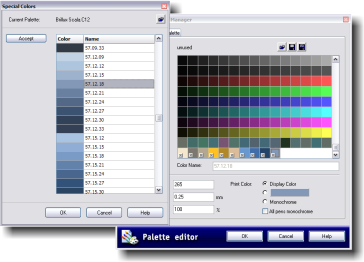
Spirit offers an option called Special Colours in the Colour Palette manager to access Resene electronic colours so that you can add those colours to your standard colour palette for use in your drawing. When these colours are added to the standard colour palette they will be marked with an x, which indicates that these special colours are protected (they cannot be edited).
To find out more about Spirit visit www.procadsys.co.nz or email matt@procadsys.co.nz.
 Get inspired ! Subscribe Get saving ! Apply for a DIY card

Can't find what you're looking for? Ask us!


Company profile | Terms | Privacy policy | Quality and environmental policy | Health and safety policy
Colours shown on this website are a representation only. Please refer to the actual paint or product sample. Resene colour charts, testpots and samples are available for ordering online. See measurements/conversions for more details on how electronic colour values are achieved.
What's new | Specifiers | Painters | DIYers | Artists | Kids | Sitemap | Home | TOP ⇧